Looking for an Overleaf alternative?
Overleaf is a powerful, well-established LaTeX editor. KlarTeX takes a different approach: write in a visual editor with instant preview, collaborate in real time, and export professional LaTeX only when you need it.
The core difference: visual-first, LaTeX when you need it
In a source-first workflow your document lives as LaTeX (opens in new tab) code, and you compile to see the typeset result. That is enormously flexible — and it means syntax, packages, and error logs are part of everyday writing.
KlarTeX inverts this: you write in a visual editor where equations, figures, tables, and citations render instantly. When it is time to submit, you export a publication-ready PDF or a complete LaTeX project.
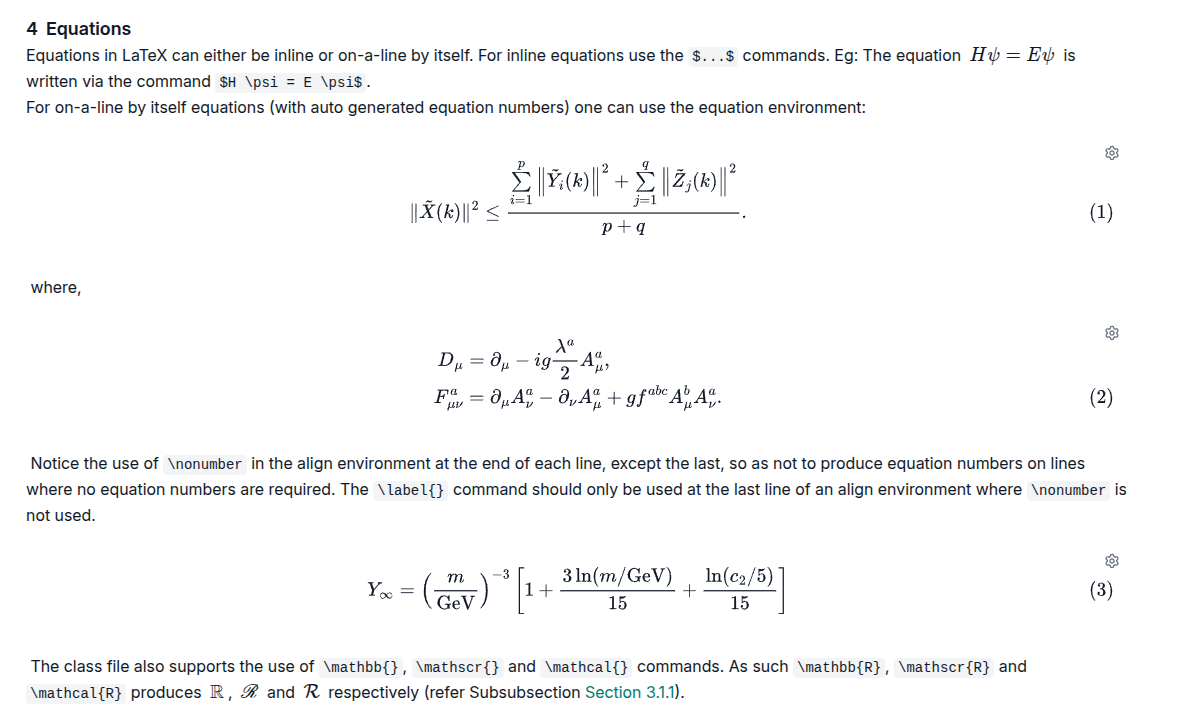
KlarTeX vs. Overleaf at a glance
An honest comparison — the right choice depends on how you like to write
| KlarTeX | Overleaf | |
|---|---|---|
| Editing model | Visual editor — formatting renders as you type | LaTeX source editor — typeset output via compilation |
| Preview | Instant, no compile step | Recompile to refresh the PDF preview |
| LaTeX knowledge | Not required — export LaTeX when you need it | Recommended for day-to-day writing |
| Import | DOCX, Markdown, HTML, EPUB, Jupyter & more via Pandoc | Existing LaTeX projects |
| Export | PDF (cloud LaTeX compilation) and complete LaTeX ZIP archive | PDF and LaTeX source |
| Citations | Mendeley and Semantic Scholar import with automatic formatting | BibTeX; reference-manager sync on paid plans |
| Mobile | Responsive editor for phones and tablets | Designed for desktop browsers |
| Pricing | Free plan; Pro at €10/month | Free plan; paid plans for more collaborators and features |
KlarTeX is a great fit if you…
- Want to focus on content instead of syntax and compile errors
- Collaborate with co-authors who don't write LaTeX
- Import drafts from Word, Markdown, or Jupyter
- Review and edit on tablets or phones
- Still need clean LaTeX output for journal submission
Overleaf may suit you better if you…
- Prefer writing raw LaTeX with full control over packages
- Depend on specific journal templates and document classes
- Have established LaTeX projects and toolchains
- Need fine-grained control over the preamble day to day
Frequently asked questions
Is KlarTeX a free Overleaf alternative?
Yes. KlarTeX has a free plan with unlimited documents, 100 MB storage, and 10 PDF compilations per month. The Pro plan (€10/month) adds 10 GB storage and 1,000 PDF compilations per month.
Can I export my KlarTeX documents to LaTeX?
Yes. You can export a complete LaTeX project as a ZIP archive — source files, bibliography, and images included — ready for journal submission or further editing in any LaTeX toolchain.
Can I import my existing documents?
Yes. KlarTeX imports DOCX, Markdown, HTML, EPUB, Jupyter notebooks, and more via Pandoc, so you can move existing drafts into a visual editing workflow.
Do I need to know LaTeX to use KlarTeX?
No. You write in a visual editor with instant formatting preview. LaTeX only appears when you choose to export, and equations can be written visually or in LaTeX syntax.
Does KlarTeX support real-time collaboration?
Yes. Co-authors can edit the same document simultaneously with conflict-free synchronization, and inline comments support review workflows.
Try the visual way to write LaTeX
Free to start — no credit card, no LaTeX required.
Start Writing Free